
Table of Contents
Running a lean solopreneur business, creator channel, or digital marketing agency in 2026 means competing against media corporations with massive production teams. YOU GUYS, there is truly nothing more frustrating than paying fifty dollars a month for an AI software subscription only to realize it places intrusive watermarks on your client exports, burns through hidden monthly generation credits in three days, or produces plasticky, uncanny-valley headshots with distorted fingers and crossed eyes. Having scripted, rendered, published, and analyzed thousands of AI video storyboards, executive photo sets, and viral analytics metrics, we developed this complete buying guide so you can build a high-ROI creative software stack without blowing your monthly software budget.
| AI Creative Domain | Core Mechanism & Output Quality | Key Solopreneur Advantage | Specialist Tool Hub |
|---|---|---|---|
| Automated Long-to-Short Video | Script-to-Video & Auto-B-Roll Sync (15M+ Getty library, auto captions, AI voiceovers) | Turns 2,000-word blogs into 10 viral YouTube Shorts and TikToks in under 15 minutes | Pictory AI |
| Studio Executive Headshots | Diffusion Model LoRA Training (40-to-100 hyper-realistic 4K portraits, natural skin texture) | Replaces $400 in-person photographer studio sessions with 60-minute automated turnaround | Aragon AI |
| Viral Video Demand Analytics | Outlier Thumbnail & Packaging Engine (High view-to-subscriber breakout detection) | Uncovers validated video topics with 10x typical viewer velocity before writing scripts | 1of10 |
Step 1: AI Video Creation — Text-to-Video vs Manual Timeline Editing
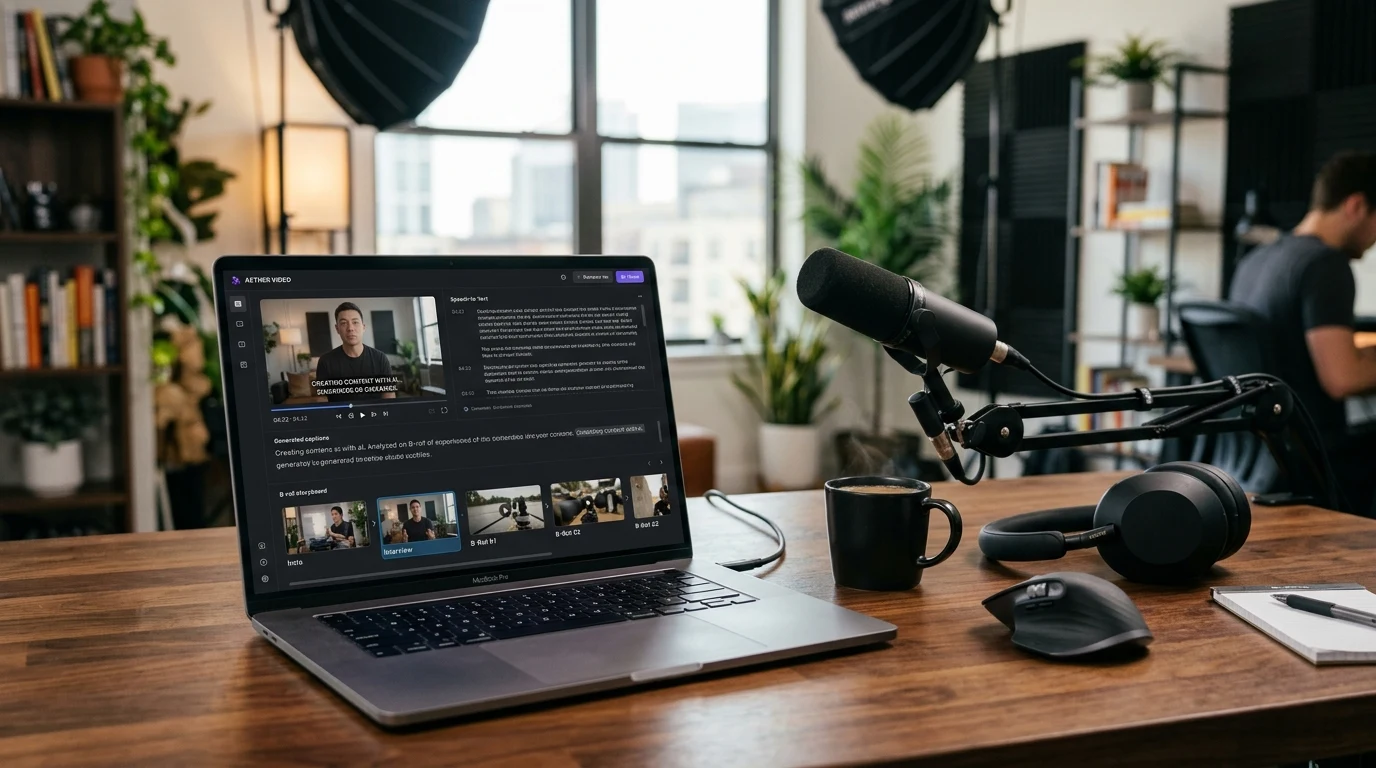
For independent creators and digital consultants, video content is non-negotiable for organic reach. However, traditional video editing in Premiere or Final Cut takes four to eight hours per video. When evaluating AI video generation platforms, focus on these critical production capabilities:
- Script-to-Video Storyboarding: Look for platforms like Pictory AI that automatically analyze your blog text or script, break it down into natural scene sentences, and automatically pair each sentence with contextually relevant, licensed 1080p B-roll footage from premium libraries (like Getty or Storyblocks).
- Automatic Captioning & Filler Word Removal: 85% of mobile social video is consumed with the sound muted. Your AI video tool should automatically generate kinetic, highlighted subtitles (Karaoke style) and automatically cut out “ums,” “ahs,” and awkward dead silences from recorded podcast interviews with one click.
- Commercial Copyright Clearance: Never use consumer AI tools that scrape unlicensed stock clips. Insist on platforms that provide commercial indemnity and full copyright ownership of all exported MP4 files. Read our hands-on workflow testing in the Pictory AI vs InVideo review.
Step 2: AI Headshot Generators — Avoiding the Uncanny Valley
Whether updating your LinkedIn presence, executive team website, or speaker portfolio, professional headshots establish immediate digital trust. However, early AI photo apps produced glossy, wax-figure portraits with blurred ears, plastic skin, and warped teeth.
In 2026, leading headshot engines like Aragon AI utilize personalized LoRA fine-tuning. You upload 10 to 14 casual smartphone selfies from various angles, and the neural network trains a temporary facial model that preserves your genuine bone structure, natural eye color, subtle smile lines, and authentic hair texture. You receive between 40 and 100 studio-lit portraits across diverse business settings (boardroom, modern tech office, outdoor terrace) in under an hour for less than the cost of an Uber ride to a photo studio. Check out our detailed photo comparisons in the Aragon AI vs HeadshotPro showdown.
Step 3: Creator Analytics — Outlier Detection vs Commodity Keyword Volume
Most content creators fail because they produce videos on topics nobody cares about, or enter hyper-saturated search terms where established channels dominate. Traditional SEO tools show search volume, but search volume doesn’t drive homepage recommendations or YouTube algorithm explosions.
Modern creator growth tools (like 1of10) specialize in Outlier Video Detection. An outlier is a video that achieves 5x to 50x more views than the channel’s average subscriber count—proving that the packaging concept, hook, and thumbnail angle struck an emotional nerve in the algorithm. By reverse-engineering validated outlier formats across your niche, you dramatically increase your click-through rates (CTR) and average view duration (AVD) from day one. See our viral case studies in the 1of10 vs VidIQ analytics guide.
Budget Tiers & Finding Verified AI Tool Discounts
Optimizing your monthly software overhead is easy when you avoid duplicate tool categories:
– $35 – $65 (One-Time): Executive AI headshot packages (Aragon AI) delivering 50+ high-res portraits.
– $20 – $40 / month: Professional AI video production (Pictory AI) with 30–60 monthly video renders and licensed stock footage.
– $30 – $50 / month: Outlier viral research engines (1of10) with multi-niche thumbnail tracking.
I remember feeling so frustrated when Pictory’s annual 20% discount code expired right before our planned content revamp, but whenever I see verified 20% promotional discounts live on our Pictory AI coupon hub or the Aragon AI store page, grabbing enterprise-grade creative automation for under thirty dollars a month feels like a complete cheat code. Make sure to also check our curated Best AI Creative Tools Roundup.
Common AI Software Buying Pitfalls to Avoid
- Creeping Credit Expirations: Many AI platforms use complicated “credits” that expire at the end of each billing cycle, meaning unused generations simply vanish. Seek out platforms with roll-over credits or clear monthly minute allowances.
- Missing Team Workspace Sharing: If you work with a freelance assistant or social media manager, ensure the tool allows multiple user logins without charging extra per seat.
- Hidden Rendering Queues: Free or cut-rate AI video apps place your exports in long cloud server queues that can take three hours during peak times. Choose services with dedicated GPU cloud infrastructure for 5-minute render speeds.
Final AI Creative Tools Buyer’s Checklist
Before entering your credit card, ensure your new creative stack satisfies these requirements:
✅ Full commercial usage and copyright ownership of all outputs
✅ Transparent monthly render minute allowances without hidden fees
✅ High-resolution 1080p/4K exports with zero platform watermarks
✅ Proven, natural facial LoRA fine-tuning for headshots
✅ Data-driven outlier validation before spending time on content production
Wishing you guys explosive channel growth, polished executive branding, and massive savings on all your creative software subscriptions this year!
Affiliate Disclosure
Some links may be affiliate links. This may earn KerryPicks a commission at no extra cost to you. Recommendations are based on independent research and analysis. Learn more

Related Articles
 Reviews & Buying Guides
Akko vs Gamakay: Which Budget Mechanical Keyboard Brand Fits Your Setup?
 Reviews & Buying Guides
Carpuride vs In-Dash Stereo: Is a Portable Wireless CarPlay Screen Worth It in 2026?
 Reviews & Buying Guides