
Table of Contents
MelGeek vs NuPhy: The Quick Take
If you have spent any time exploring desk setups on Instagram, Reddit, or YouTube, you know that mechanical keyboards are no longer just utilitarian office peripherals—they are personal design statements. Two brands that consistently capture the imagination of modern creators are MelGeek and NuPhy.
While both brands make stunning wireless keyboards with exceptional out-of-the-box sound profiles, they appeal to very different aesthetic tastes and typing workflows:
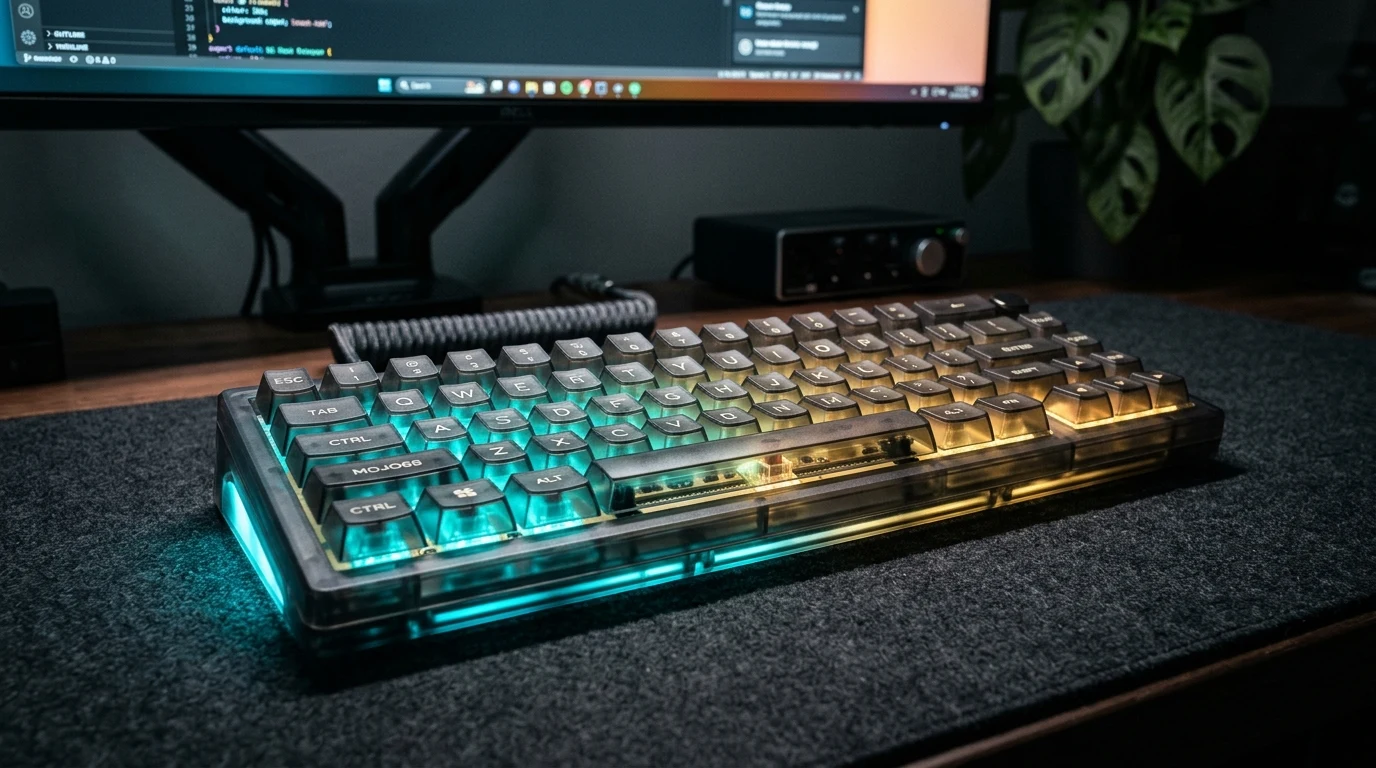
- Choose MelGeek if you want a head-turning, avant-garde statement piece for your desk. Keyboards like the Mojo68 and Mojo84 feature transparent polycarbonate chassis, exposed interior PCB styling, and deeply sculpted spherical keycaps. Combined with an ultra-cushioned gasket mount, MelGeek delivers an incredibly deep, rich “thocky” typing sound right out of the box with zero modding required.
- Choose NuPhy if you want sleek, modern productivity with universal Mac/Windows integration. Whether you opt for the ultra-slim Air75 (designed to rest directly over a MacBook keyboard while traveling) or the substantial Halo75 desktop series with perimeter RGB lighting, NuPhy delivers snappy acoustics, aluminum frames, and open-source QMK/VIA web-based key remapping.
Core Comparison: How MelGeek and NuPhy Match Up
To help you evaluate their design aesthetics, acoustic signatures, and software versatility, here is how their flagship boards compare:
| Feature / Metric | MelGeek (Mojo68 / Mojo84) | NuPhy (Air75 V2 / Halo75) |
|---|---|---|
| Core Aesthetic | Transparent cyberpunk, retro-futuristic designer art | Clean Nordic-inspired minimalism, colorful accents & aluminum |
| Case Material | High-clarity molded polycarbonate with silicone bumpers | Anodized aluminum top frame with ABS/polycarbonate base |
| Mounting Style | Advanced Poron gasket mount (plush, bouncy travel) | Gasket mount (Air V2) or Silicone plate-dampened (Halo) |
| Acoustic Profile | Deep, muted, bass-heavy “thock” | Crisp, snappy clack (Air) or marbly/creamy pop (Halo) |
| Keycap Profile | Custom sculpted MCR / MDA profile PBT keycaps | Low-profile nSA or high-profile mSA PBT keycaps |
| Software Customization | MelGeek Hive (proprietary desktop software) | QMK / VIA web configurator (browser-based, no install) |
| Connectivity | Tri-mode: Bluetooth 5.1, 2.4GHz dongle, USB-C wired | Tri-mode: Bluetooth 5.1, 2.4GHz (1000Hz polling), USB-C wired |
| Price Range | $170 to $230 | $110 to $150 |
MelGeek Deep Dive: Avant-Garde Design & Cushion Acoustics
MelGeek is the haute-couture design house of mechanical keyboards. When the brand launched the Mojo68, it instantly challenged the boring sea of black and gray plastic office keyboards.
The Transparent Cyberpunk Chassis
MelGeek keyboards look like futuristic industrial artifacts. The crystal-clear molded polycarbonate case exposes the internal silicone dampening gaskets, brass plate accents, and circuit board traces. Paired with bold typographic keycap themes (like *Plastic*, *Retro*, or *Monster*), a MelGeek keyboard instantly anchors any minimalist or neon-lit desk setup.
Plush Gasket Bounce & Deep “Thock”
Beyond looks, MelGeek is renowned for its acoustic engineering. Inside the case, the switch plate is completely suspended by precision silicone gasket pads, sandwiched between dense Poron foam layers. When you type, the keys feel soft and pillowy under your fingertips, eliminating harsh metallic bottom-out ping.
The sound profile is distinctly deep and muted—delivering that coveted raindrops-on-wood “thock” that mechanical keyboard fans spend hours modifying custom boards to achieve.
If you are looking to elevate your workstation with a MelGeek board, make sure to check current MelGeek offers before completing your purchase.
NuPhy Deep Dive: The Ergonomic Mac-Friendly Workhorse
Where MelGeek prioritizes radical industrial aesthetics, NuPhy focuses relentlessly on daily typing comfort, portability, and frictionless software.
The Low-Profile Air75: Mobile Productivity
NuPhy’s *Air75 V2* is arguably the best mobile mechanical keyboard on the market. Measuring less than an inch thick with ultra-low-profile mechanical switches, it fits easily into a laptop sleeve. It features custom rubber feet designed to nest directly between the keys of a MacBook Pro, transforming a laptop’s mushy scissor switches into a tactile mechanical delight while working in coffee shops or airport lounges.
The Halo75: Desktop Substance & Perimeter Glow
For traditional desktop setups, NuPhy’s *Halo75* adds an anodized aluminum top case, silicone sound-absorbing base pads, and a distinctive “GhostBar” spacebar engineered to eliminate hollow spacebar clatter. A unique RGB halo accent wraps around the perimeter of the frame, casting a gentle glow across your desk mat.
Open-Source QMK/VIA Software
NuPhy’s major technical trump card is full support for QMK and VIA. Instead of downloading heavy proprietary software that runs background processes on your computer, you simply open a web browser, connect your keyboard, and remap keys, configure complex macros, or adjust lighting in seconds. Settings are saved directly to the keyboard’s onboard memory chip.
Decision Checklist: Which Keyboard Fits Your Desk?
Go with MelGeek if:
- You want an iconic, transparent designer conversation piece for your desk setup.
- You love a soft, bouncy gasket feel and a deep, bassy “thocky” sound profile out of the box.
- You prefer tall, sculpted spherical keycaps that cup your fingertips.
- You want a compact 65% or 75% layout that maximizes mouse movement room.
- Your budget accommodates a premium $180+ designer keyboard.
Go with NuPhy if:
- You want an ultra-slim low-profile keyboard (Air75) for travel, coffee shops, and MacBook pairing.
- You need instant, browser-based QMK/VIA key remapping for programming or complex shortcuts.
- You want a solid aluminum desktop board (Halo75) with crisp, marbly switch acoustics.
- You prioritize fast 1,000Hz polling rates for wireless gaming over 2.4GHz.
- You want high-tier custom keyboard features for under $140.
Frequently Asked Questions
Can I swap the switches on MelGeek and NuPhy keyboards?
Yes. Both MelGeek and NuPhy boards feature hot-swappable switch sockets. MelGeek keyboards accept standard 3-pin and 5-pin Cherry MX-style switches. NuPhy’s Halo series also accepts standard 5-pin switches, while the Air series accepts low-profile Gateron KS-33 switches.
Are both keyboards fully compatible with macOS?
Yes. Both brands include dedicated Mac keycaps (Command, Option) in the box and feature physical toggle switches on the back to alternate between macOS and Windows layouts with matching media shortcut functions.
Does the transparent case on MelGeek scratch easily?
MelGeek manufactures its transparent Mojo cases from high-impact polycarbonate, which is significantly more shatter- and scratch-resistant than basic acrylic. However, to keep the case pristine, we recommend cleaning it with a soft microfiber cloth rather than harsh abrasive cleaners.
{
“@context”: “https://schema.org”,
“@type”: “FAQPage”,
“mainEntity”: [
{
“@type”: “Question”,
“name”: “Can I swap the switches on MelGeek and NuPhy keyboards?”,
“acceptedAnswer”: {
“@type”: “Answer”,
“text”: “Yes. Both brands offer hot-swappable switch sockets, allowing you to easily pull out and replace switches without soldering.”
}
},
{
“@type”: “Question”,
“name”: “Are both keyboards fully compatible with macOS?”,
“acceptedAnswer”: {
“@type”: “Answer”,
“text”: “Yes. Both MelGeek and NuPhy provide physical hardware toggles for Mac/Windows layouts and include macOS modifier keycaps in the packaging.”
}
},
{
“@type”: “Question”,
“name”: “Does the transparent case on MelGeek scratch easily?”,
“acceptedAnswer”: {
“@type”: “Answer”,
“text”: “MelGeek uses high-grade polycarbonate that resists typical desk wear well, though cleaning with a soft microfiber cloth is recommended to maintain optical clarity.”
}
}
]
}
Affiliate Disclosure
Some links may be affiliate links. This may earn KerryPicks a commission at no extra cost to you. Recommendations are based on independent research and analysis. Learn more

Related Articles
 Reviews & Buying Guides
Akko vs Gamakay: Which Budget Mechanical Keyboard Brand Fits Your Setup?
 Reviews & Buying Guides
Carpuride vs In-Dash Stereo: Is a Portable Wireless CarPlay Screen Worth It in 2026?
 Reviews & Buying Guides