
Table of Contents
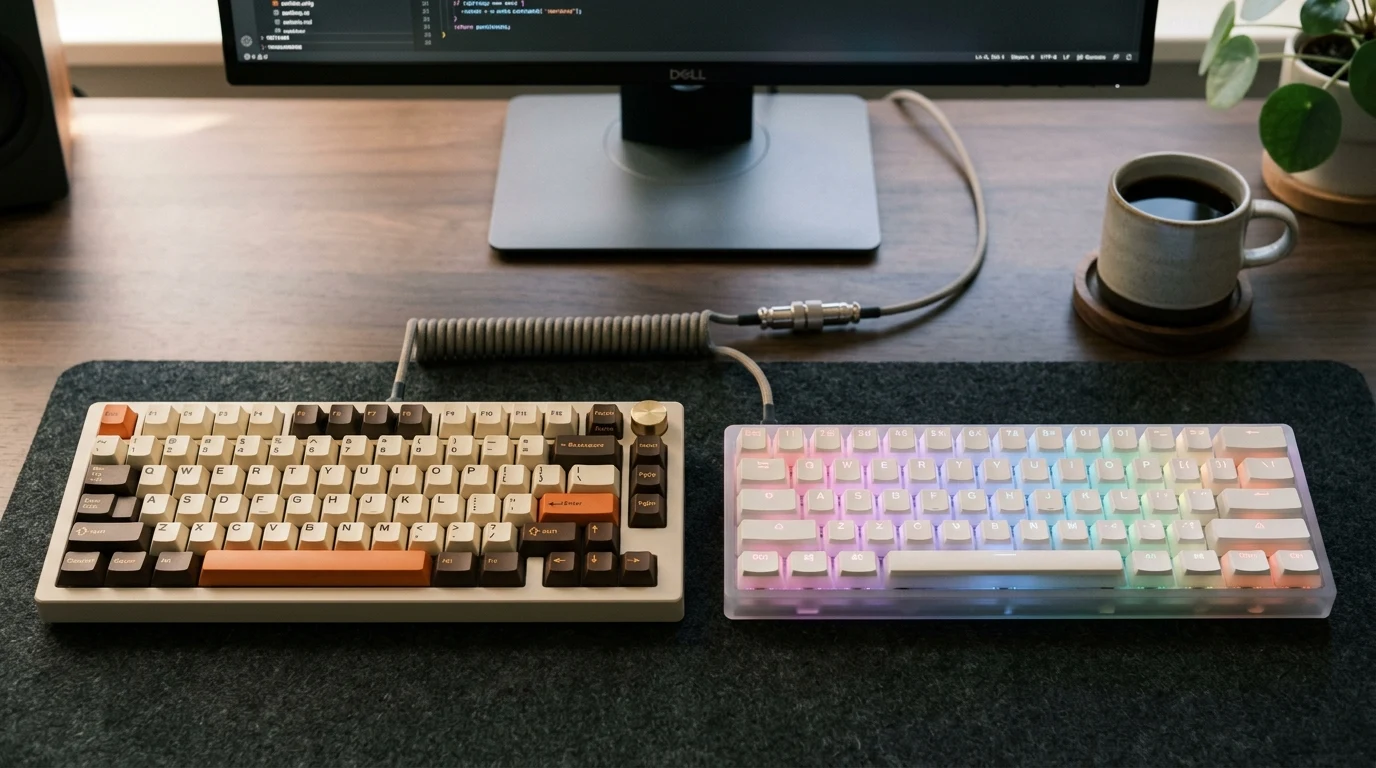
Trying to decide between Akko and Gamakay for your next mechanical keyboard? Both brands target the same sweet spot — enthusiast-quality hardware under $100 — but they approach it from very different angles. Here’s our take after digging into specs, community feedback, and official product details.
The quick version: Akko delivers a more polished out-of-the-box experience with premium PBT keycaps, well-tuned stabilizers, and a wide variety of sound-focused switches. Gamakay shines if you need genuinely quiet switches, love bright RGB aesthetics, or want access to Hall Effect magnetic switches for competitive gaming. Neither brand is universally better — it comes down to what matters most in your daily setup.
We have affiliate partnerships with both Akko Europe and Gamakay, so we’ll flag that upfront. Our comparison applies the same criteria to both sides, and we’ll tell you when one brand falls short.
Switch Ecosystem: Sound Variety vs Purposeful Silence
This is probably the biggest difference between the two brands, and it’s worth understanding before anything else.
Akko’s CS and V3 Pro lineup is massive. You can pick from dozens of switch flavors — Cream Yellow Pro for a creamy thock, Lavender Purple for a light tactile bump, Jelly Black for a smooth linear feel, Piano Pro for a deeper marble-like sound. The newer dustproof box-stem designs on Pro variants keep the stem tight with minimal wobble. If you enjoy the satisfying click or thock of a mechanical keyboard and want to fine-tune exactly how it sounds, Akko gives you a lot more to work with.
Gamakay’s standout switches are the Phoenix (silent linear) and Pegasus (silent tactile). These aren’t just “quiet-ish” — they use internal rubber and silicone dampeners along the stem rails to seriously muffle both the downstroke and the return. The trade-off? A slightly mushier bottom-out compared to standard un-dampened switches. The Pegasus tactile bump has been compared to a softer, cushioned Topre-like feel, while the Phoenix is whisper-quiet for a linear.
What makes this interesting is that Gamakay also offers these silent switches in magnetic Hall Effect (HE/TMR) versions for rapid-trigger boards. If you’re a competitive gamer who wants rapid-trigger responsiveness without the loud clacking, that combination is genuinely hard to find from other brands at this price.
Akko does have its own silent options (the Penguin and Fairy), but community comparisons suggest they tend to be slightly louder and higher-pitched than Gamakay’s dampening designs. If silence is your primary goal, Gamakay has the edge here.
| Aspect | Akko CS / V3 Pro | Gamakay Phoenix / Pegasus |
|---|---|---|
| Switch variety | Dozens of options (linear, tactile, clicky) | Focused on silent linear + silent tactile |
| Sound profile | Thocky, clacky, or creamy — you choose | Whisper-quiet with internal dampeners |
| Bottom-out feel | Crisp and firm | Cushioned, slightly mushy |
| Stem stability | Tight (dustproof box-stem on Pro) | Improved in V2/V3, but softer housing |
| Hall Effect / magnetic | Separate product line (not CS ecosystem) | Available as Phoenix V3 HE — silent + rapid trigger |
Keycap Quality: PBT Durability vs Shine-Through RGB
If you’ve ever wondered why some keyboard keycaps start looking greasy after a few months, the material is usually the reason.
Akko’s stock keycaps are made from PBT plastic with either doubleshot or dye-sublimation legends. This matters for two reasons: the legends physically cannot fade (they’re molded or infused into the plastic, not printed on top), and PBT resists developing that shiny, oily patina that comes from daily finger contact. Wall thickness typically runs 1.3–1.5 mm, which contributes to a deeper, more muted sound when you type. Akko also offers multiple keycap profiles — their proprietary ASA (a medium-height rounded design), plus standard Cherry, OEM, and MOA options.
Gamakay’s stock keycaps are predominantly ABS plastic with laser-etched or UV-printed shine-through legends designed to let RGB backlighting glow through the characters. The visual effect is genuinely striking, especially on their transparent acrylic case keyboards. The downside? ABS is softer and thinner, so you’ll notice surface shine developing over months of use, and the sound profile leans higher-pitched and slightly hollow compared to thick PBT.
Worth noting: Gamakay does sell aftermarket doubleshot PBT keycap sets if you want to upgrade later, but you’ll pay extra on top of the keyboard price.
Bottom line: If you care about how your keycaps feel and hold up over a year or two, Akko’s stock PBT is a clear step up. If maximizing RGB glow is more important, Gamakay’s shine-through ABS does that job well — just expect to eventually swap them out if texture matters to you.
Build Construction and Sound Dampening
Both brands offer gasket-mounted keyboards in the popular 75% layout, so the typing feel has that slight cushioned flex rather than a rigid plate-mounted thud. The execution, though, is noticeably different.
Akko’s 5075B Plus uses a polycarbonate (PC) plate with silicone gasket tabs, giving it a bouncy, forgiving typing feel. The case is high-grade ABS plastic that feels dense rather than hollow. Stock stabilizers come reasonably well-lubed from the factory — the spacebar and larger keys generally don’t rattle straight out of the box. The PCB is 1.6 mm thick with south-facing RGB LEDs (which prevents interference with Cherry-profile keycaps) and supports both 3-pin and 5-pin hot-swappable switches. There’s also an aluminum rotary knob and dual RGB side-light strips.
Gamakay’s TK75 series packs heavy internal dampening foam layers and also uses a gasket mount, but the overall flex feels more restrained. Some versions even include hardware that lets you convert to a top-mount configuration if you prefer firmer feedback. The standout features here are the mini LCD display screen on V2/HE variants and a rotary volume knob. If you step up to the TK75 Pro, you get an aluminum chassis — a meaningful upgrade that Akko doesn’t offer at this price point.
The catch with Gamakay? Stock stabilizers are a known weak point. Reviewers and community members consistently note that they tend to feel loose or rattly out of the box. You’ll likely want to lube and possibly clip or band-aid mod them to get a clean typing experience. If you’re comfortable with that kind of tinkering, it’s a minor annoyance. If you want something ready to use immediately, Akko has the advantage.
Wireless Connectivity and Firmware
Both brands offer tri-mode connectivity — Bluetooth, 2.4 GHz wireless dongle, and wired USB-C. The day-to-day reliability, however, isn’t quite equal.
Akko separates its Bluetooth into BT 3.0 and BT 5.0 profiles, which is handy if you’re connecting to a mix of older and newer devices. The 2.4 GHz dongle works reliably overall, though some users report a brief lag when the keyboard wakes from sleep mode. Akko provides firmware updates through their Cloud Driver software — it’s feature-rich but undeniably bloated as a peripheral utility. One serious caution: if a firmware update gets interrupted (cable disconnect, power loss), the wireless module can get permanently corrupted. Follow their update instructions carefully.
Gamakay’s tri-mode switching is straightforward (Fn + key combos), but the 2.4 GHz connection is more prone to interference, especially near USB 3.0 ports or Wi-Fi routers. Users sometimes need a USB extender to bring the dongle closer to the keyboard. The bigger headache is firmware management: Gamakay releases many model variants (standard, Pro, SE, V2, HE, TMR), and finding the exact matching firmware file can be confusing. Flashing the wrong variant — even for what looks like the same keyboard layout — can break onboard functions. Their companion software also struggles to detect the keyboard when connected wirelessly.
For daily wireless use, Akko is generally the safer bet. Gamakay’s wireless works fine in many setups, but it requires more patience and troubleshooting awareness.
Price, Shipping, and Returns
The sticker price isn’t the whole story here — landed cost, return policies, and available discounts make a real difference.
| Factor | Akko (via Akko Europe) | Gamakay |
|---|---|---|
| Price range | $55–$120 USD / €55–€110 EUR | $50–$95 USD |
| Shipping | EU warehouse, 2–5 business days, no customs | International couriers, 7–20 business days, buyer pays import duties |
| Return window | 14 days (EU statutory) | 14 days |
| Restocking fee | Not stated | 35% on non-defective returns |
| Defect reporting | Standard warranty process | Must report within 7 days |
| Warranty | 1 year (PCB, hot-swap, connectivity) | Standard manufacturer warranty |
| KerryPicks coupon | KAZELL — 10–25% off | kazga — up to 30–36% off |
For European buyers, Akko Europe’s EU warehouse shipping is a significant advantage — no customs surprises and faster delivery. Gamakay’s base prices are slightly lower, but the international shipping time, potential import duties, and that 35% restocking fee on returns change the math. Gamakay’s larger coupon discount (up to 36% with kazga) can offset some of this, but check the exact discount on your specific keyboard before ordering.
Who Should Choose Which?
Choose Akko if:
- You want a refined typing experience straight out of the box — quality PBT keycaps, pre-tuned stabilizers, and a satisfying sound profile without modification
- You enjoy exploring different switch sounds and want a huge variety to choose from
- You’re in Europe and value fast, duty-free shipping with straightforward returns
- You use your keyboard wirelessly daily and want more reliable connectivity
Choose Gamakay if:
- Quiet typing is your top priority — for an office, shared space, late-night gaming, or streaming
- You want a bright, transparent RGB showcase build
- You’re interested in Hall Effect magnetic switches with rapid-trigger for competitive gaming, especially with silence
- You’re comfortable modding stabilizers and troubleshooting firmware in exchange for a lower base price and features like a mini LCD display
Neither might be right if: you need a full-size layout, a premium one-piece aluminum case, or deep firmware customization through open-source tools like QMK or VIA.
How We Researched This
This comparison is based on desk research: official product pages from both brands, published specifications, editorial reviews from keyboard enthusiast sites, and community feedback from Reddit and keyboard forums. We did not perform hands-on testing, controlled sound measurements, or long-term durability evaluation. Prices, coupon values, and product availability were checked in October 2026 but may change — verify current details before ordering.
Ready to compare specific models? Check current Akko offers or check current Gamakay offers on KerryPicks.
KerryPicks earns a commission when you shop through our partner links at no extra cost to you. This doesn’t influence our comparison — we apply the same criteria to both brands and recommend whichever fits your situation better.
Affiliate Disclosure
Some links may be affiliate links. This may earn KerryPicks a commission at no extra cost to you. Recommendations are based on independent research and analysis. Learn more

Related Articles
 Reviews & Buying Guides
Carpuride vs In-Dash Stereo: Is a Portable Wireless CarPlay Screen Worth It in 2026?
 Reviews & Buying Guides
ADO E-Bike vs Heybike: Which Folding Electric Bike Is Best in 2026?
 Reviews & Buying Guides